← Všechny návodyAll guides
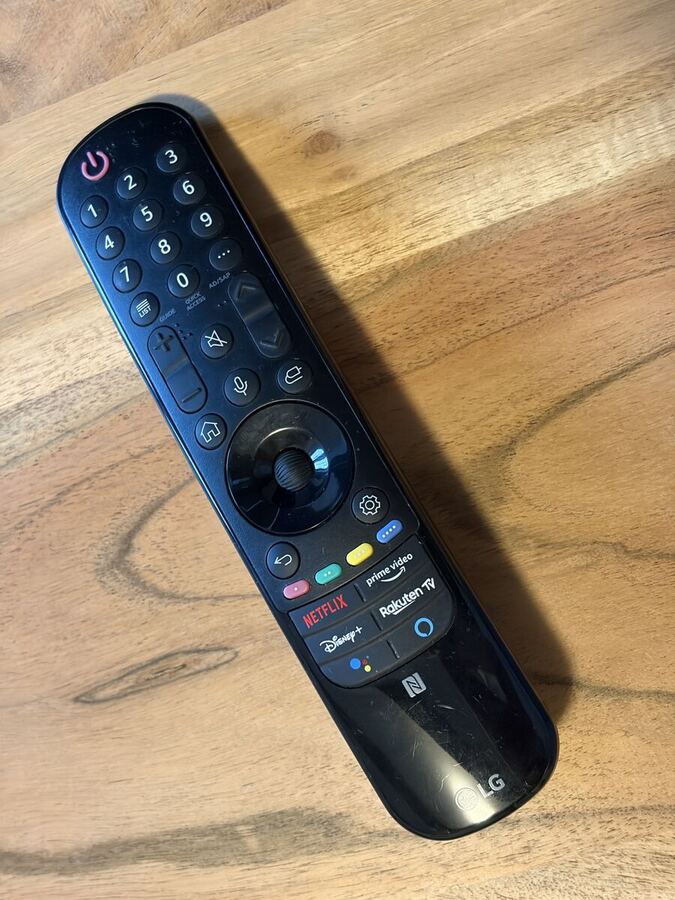
Televize LG OLEDLG OLED TV
LG OLED 55" · Magic Remote
Obývací pokojLiving room
Netflix a spol.: přihlaste se svým účtem a před odjezdem se odhlaste.Netflix etc.: sign in with your own account and sign out before you leave.
Chytrá televize s aplikacemi Netflix, YouTube, Disney+ a dalšími. Ovladač funguje jako myš.
Smart TV with Netflix, YouTube, Disney+ and more. The remote works like a mouse pointer.
OvladačRemote
- Červené ⏻ vlevo nahoře – zapnout / vypnout.Red ⏻ top left – on / off.
- Zamávejte ovladačem – na obrazovce se objeví kurzor. Kolečko = potvrdit a posouvat.Wave the remote – a pointer appears on screen. The wheel = click and scroll.
- Domeček – nabídka aplikací. Barevná tlačítka dole spustí Netflix, Prime Video, Disney+.House button – app bar. The buttons at the bottom open Netflix, Prime Video, Disney+.
- Ozubené kolo – rychlé nastavení (obraz, zvuk, časovač vypnutí).Gear button – quick settings (picture, sound, sleep timer).
Vlastní obsahYour own content
- iPhone / Mac: Ovládací centrum → Zrcadlení obrazovky → LG TV (AirPlay).iPhone / Mac: Control Centre → Screen Mirroring → LG TV (AirPlay).
- Android: Sdílení obrazovky / Smart View / Cast.Android: Screen share / Smart View / Cast.
- Telefon musí být na stejné Wi-Fi jako televize.Your phone must be on the same Wi-Fi as the TV.
- Ve streamovacích aplikacích se před odjezdem odhlaste.Please sign out of streaming apps before you leave.
Když něco nejdeTroubleshooting
- Není obraz („No signal“): stiskněte tlačítko vstupu a zvolte TV / aplikace.“No signal”: press the input button and choose the TV / apps.
- Nefunguje kurzor: stiskněte kolečko nebo vyměňte baterie AA.No pointer: press the wheel or replace the AA batteries.
Pořád nevíte?Still stuck?
Napište hostiteli přes aplikaci Airbnb – odpovídáme rychle.
Message your host in the Airbnb app – we reply quickly.